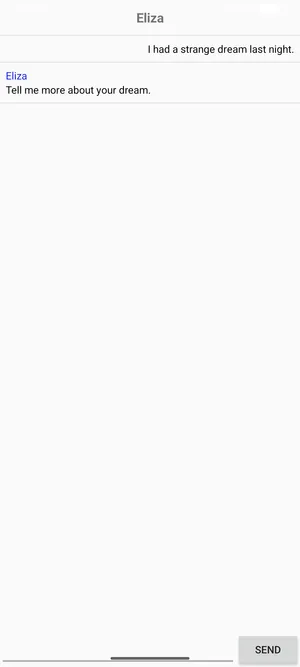
Android example
This tutorial walks through building a full Android chat app for ELIZA, a classic natural-language processor that runs at demo.connectrpc.com. If you just want to see Connect-Kotlin make a request from a Kotlin program, the Getting started quickstart is shorter.
The ELIZA service is implemented using Connect-Go and supports the gRPC, gRPC-Web, and Connect protocols, all of which Connect-Kotlin can talk to.
Prerequisites
Section titled “Prerequisites”- Android Studio installed.
- The Buf CLI installed, and included in the
$PATH. - Set up a virtual device in Android Studio, or use a physical device.
Create a new Android project from Android Studio
Section titled “Create a new Android project from Android Studio”Once Android Studio is set up, click New Project in the welcome screen and walk through the wizard:
- Under Phone and Tablet, select Empty Views Activity and click Next.
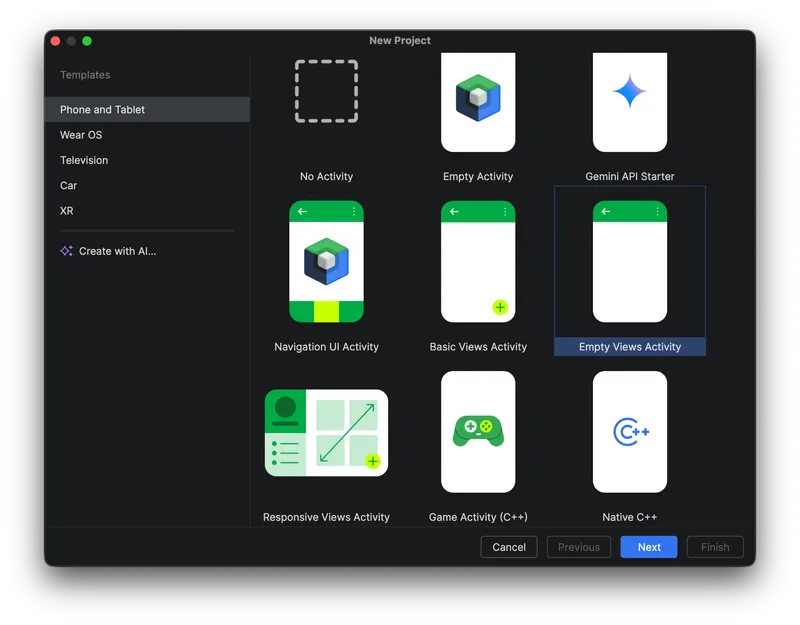
- Set Name to
Elizaand Package name tocom.example.eliza. Set Minimum SDK toAPI 28 (Android 9.0). Leave the defaults for language (Kotlin) and Build configuration language (Kotlin DSL).
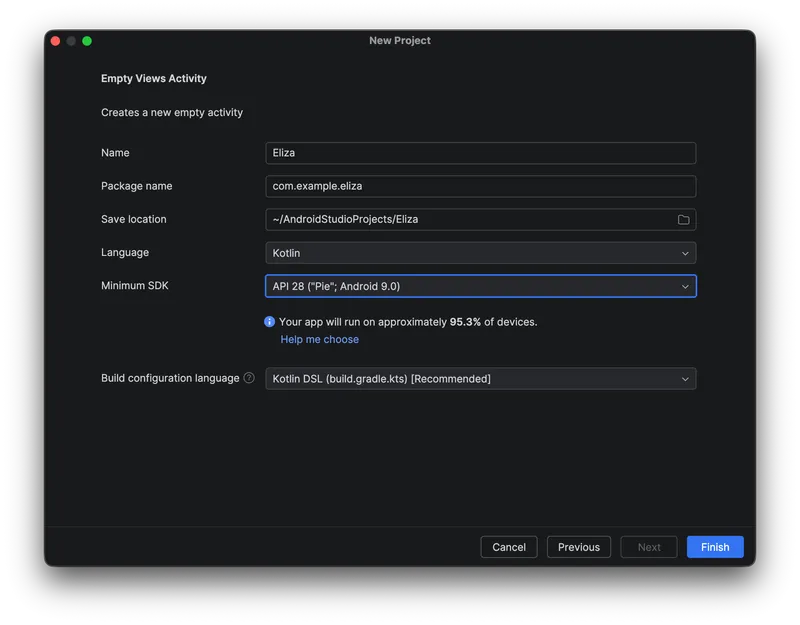
- Click Finish.
Define a service
Section titled “Define a service”Add a Protobuf file with the service definition. We’ll use a stripped-down ELIZA with a single unary RPC. The directory layout must match the Protobuf package, so:
$ mkdir -p proto/connectrpc/eliza/v1$ touch proto/connectrpc/eliza/v1/eliza.protoOpen the new file and add the following:
syntax = "proto3";
package connectrpc.eliza.v1;
message SayRequest {  string sentence = 1;}
message SayResponse {  string sentence = 1;}
service ElizaService {  rpc Say(SayRequest) returns (SayResponse) {}}
The schema declares one service (ElizaService) with one unary RPC (Say)
and the corresponding request/response messages.
Generate code
Section titled “Generate code”Generate the code with buf, a modern replacement for protoc.
Scaffold buf.yaml with buf config init, then add the proto module:
# For details on buf.yaml configuration, visit https://buf.build/docs/configuration/v2/buf-yamlversion: v2modules: - path: protolint: use: - STANDARDbreaking: use: - FILEDefine plugins in buf.gen.yaml. We use
remote plugins (a Buf Schema Registry feature) so
nothing needs to be installed locally:
# For details on buf.gen.yaml configuration, visit https://buf.build/docs/configuration/v2/buf-gen-yamlversion: v2managed: enabled: trueplugins: - remote: buf.build/protocolbuffers/java:v34.0 out: app/src/main/java opt: lite - remote: buf.build/protocolbuffers/kotlin:v34.0 out: app/src/main/java opt: lite - remote: buf.build/connectrpc/kotlin:v0.8.0 out: app/src/main/javaSee the Generating code reference for what each plugin emits and the available options. Lint the schema and run codegen:
$ buf lint$ buf generateThe generated code lands under app/src/main/java/com/connectrpc/eliza/v1/:
app/src/main/java/com/connectrpc/eliza/v1├── ElizaProto.java├── ElizaProtoKt.proto.kt├── ElizaServiceClient.kt├── ElizaServiceClientInterface.kt├── SayRequest.java├── SayRequestKt.kt├── SayRequestOrBuilder.java├── SayResponse.java├── SayResponseKt.kt└── SayResponseOrBuilder.javaUpdate the application dependencies
Section titled “Update the application dependencies”Now we’ll add the libraries the app needs. Edit app/build.gradle.kts
(not the top-level build.gradle.kts in the project root) and replace the
dependencies block with:
dependencies {    // ...    implementation("androidx.recyclerview:recyclerview:1.3.2")    implementation("androidx.lifecycle:lifecycle-runtime-ktx:2.8.7")
    implementation("com.squareup.okhttp3:okhttp:4.12.0")    implementation("com.connectrpc:connect-kotlin-okhttp:0.8.0")    implementation("com.connectrpc:connect-kotlin-google-javalite-ext:0.8.0")    implementation("com.google.protobuf:protobuf-javalite:4.34.0")    implementation("com.google.protobuf:protobuf-kotlin-lite:4.34.0")}
Sync Gradle once the dependencies are in place.
Set up the resources
Section titled “Set up the resources”Layouts
Section titled “Layouts”Create a new file in the layout directory called item.xml to describe a
single chat row. The row has a sender label (shown only for Eliza’s messages)
and the message text:
$ touch app/src/main/res/layout/item.xml<?xml version="1.0" encoding="utf-8"?><LinearLayout xmlns:android="http://schemas.android.com/apk/res/android" android:layout_width="match_parent" android:layout_height="wrap_content" android:orientation="vertical"> <LinearLayout android:layout_width="match_parent" android:layout_height="wrap_content" android:orientation="vertical" android:padding="8dp"> <TextView android:id="@+id/sender_name_text_view" android:layout_width="match_parent" android:layout_height="wrap_content" android:text="Eliza" android:textColor="#161EDE" android:visibility="gone"/> <TextView android:id="@+id/message_text_view" android:layout_width="wrap_content" android:layout_height="wrap_content" android:textColor="@android:color/black"/> </LinearLayout> <View android:layout_width="match_parent" android:layout_height="1dp" android:background="#E0E0E0"/></LinearLayout>Next, replace the contents of activity_main.xml (created by the wizard) with
the chat screen layout (a title, the message list, and the input row):
<?xml version="1.0" encoding="utf-8"?><androidx.constraintlayout.widget.ConstraintLayout xmlns:android="http://schemas.android.com/apk/res/android" xmlns:app="http://schemas.android.com/apk/res-auto" xmlns:tools="http://schemas.android.com/tools" android:layout_width="match_parent" android:layout_height="match_parent" tools:context=".MainActivity"> <TextView android:id="@+id/title_text_view" android:layout_width="match_parent" android:layout_height="48dp" android:gravity="center" android:text="Eliza" android:textSize="18sp" android:textStyle="bold" app:layout_constraintTop_toTopOf="parent"/> <View android:id="@+id/title_divider" android:layout_width="match_parent" android:layout_height="1dp" android:background="#E0E0E0" app:layout_constraintTop_toBottomOf="@+id/title_text_view"/> <androidx.recyclerview.widget.RecyclerView android:id="@+id/recycler_view" android:layout_width="match_parent" android:layout_height="0dp" app:layoutManager="LinearLayoutManager" app:layout_constraintTop_toBottomOf="@+id/title_divider" app:layout_constraintBottom_toTopOf="@+id/edit_text_view"/> <EditText android:id="@+id/edit_text_view" android:layout_width="0dp" android:layout_height="wrap_content" android:autofillHints="text" android:inputType="text" app:layout_constraintBottom_toBottomOf="parent" app:layout_constraintStart_toStartOf="parent" app:layout_constraintEnd_toStartOf="@+id/send_button"/> <Button android:id="@+id/send_button" android:layout_width="wrap_content" android:layout_height="wrap_content" android:text="Send" app:layout_constraintBottom_toBottomOf="parent" app:layout_constraintEnd_toEndOf="parent"/></androidx.constraintlayout.widget.ConstraintLayout>Manifest
Section titled “Manifest”The wizard’s AndroidManifest.xml doesn’t request network access. Add the
two uses-permission declarations:
<?xml version="1.0" encoding="utf-8"?><manifest xmlns:android="http://schemas.android.com/apk/res/android">
    <uses-permission android:name="android.permission.INTERNET"/>    <uses-permission android:name="android.permission.ACCESS_NETWORK_STATE"/>
    <application        android:allowBackup="true"        android:label="@string/app_name"        android:theme="@style/Theme.AppCompat.Light.NoActionBar">        <activity            android:name=".MainActivity"            android:exported="true">            <intent-filter>                <action android:name="android.intent.action.MAIN"/>                <category android:name="android.intent.category.LAUNCHER"/>            </intent-filter>        </activity>    </application></manifest>
Android Kotlin view scaffolding
Section titled “Android Kotlin view scaffolding”To render the chat list we need a RecyclerView.Adapter and ViewHolder. Add
a new file:
$ touch app/src/main/java/com/example/eliza/ChatRecycler.ktpackage com.example.eliza
import android.view.Gravityimport android.view.LayoutInflaterimport android.view.Viewimport android.view.ViewGroupimport android.widget.LinearLayoutimport android.widget.TextViewimport androidx.recyclerview.widget.RecyclerView
class Adapter : RecyclerView.Adapter<ViewHolder>() {
private val messages = mutableListOf<MessageData>()
fun add(message: MessageData) { messages.add(message) notifyItemInserted(messages.size - 1) }
override fun onCreateViewHolder(viewGroup: ViewGroup, viewType: Int): ViewHolder { val view = LayoutInflater.from(viewGroup.context) .inflate(R.layout.item, viewGroup, false) return ViewHolder(view) }
override fun onBindViewHolder(viewHolder: ViewHolder, position: Int) { val data = messages[position] viewHolder.messageTextView.text = data.message val params = viewHolder.messageTextView.layoutParams as LinearLayout.LayoutParams params.gravity = if (data.isEliza) Gravity.START else Gravity.END viewHolder.messageTextView.layoutParams = params viewHolder.senderNameTextView.visibility = if (data.isEliza) View.VISIBLE else View.GONE }
override fun getItemCount(): Int = messages.size}
class ViewHolder(view: View) : RecyclerView.ViewHolder(view) { val senderNameTextView: TextView = view.findViewById(R.id.sender_name_text_view) val messageTextView: TextView = view.findViewById(R.id.message_text_view)}
data class MessageData( val message: String, val isEliza: Boolean,)Talk with Eliza
Section titled “Talk with Eliza”Now we’re ready to wire up the network code. Open MainActivity.kt and
replace its contents with:
package com.example.eliza
import android.os.Bundleimport android.util.Logimport android.widget.Buttonimport android.widget.EditTextimport android.widget.TextViewimport androidx.appcompat.app.AppCompatActivityimport androidx.lifecycle.lifecycleScopeimport androidx.recyclerview.widget.RecyclerViewimport com.connectrpc.ProtocolClientConfigimport com.connectrpc.eliza.v1.ElizaServiceClientimport com.connectrpc.eliza.v1.sayRequestimport com.connectrpc.extensions.GoogleJavaLiteProtobufStrategyimport com.connectrpc.impl.ProtocolClientimport com.connectrpc.okhttp.ConnectOkHttpClientimport com.connectrpc.protocols.NetworkProtocolimport kotlinx.coroutines.Dispatchersimport kotlinx.coroutines.launch
class MainActivity : AppCompatActivity() {
    private val adapter: Adapter = Adapter()    private lateinit var titleTextView: TextView    private lateinit var editTextView: EditText    private lateinit var buttonView: Button    private lateinit var elizaServiceClient: ElizaServiceClient
    override fun onCreate(savedInstanceState: Bundle?) {        super.onCreate(savedInstanceState)        setContentView(R.layout.activity_main)        editTextView = findViewById(R.id.edit_text_view)        titleTextView = findViewById(R.id.title_text_view)        buttonView = findViewById(R.id.send_button)        // Default question to ask as a pre-fill.        editTextView.setText("I had a strange dream last night.")        val recyclerView = findViewById<RecyclerView>(R.id.recycler_view)        recyclerView.adapter = adapter
        // Create a ProtocolClient.        val client = ProtocolClient(            httpClient = ConnectOkHttpClient(),            ProtocolClientConfig(                host = "https://demo.connectrpc.com",                serializationStrategy = GoogleJavaLiteProtobufStrategy(),                networkProtocol = NetworkProtocol.CONNECT,                // Dispatch RPC I/O on Dispatchers.IO.                ioCoroutineContext = Dispatchers.IO,            ),        )        // Create the Eliza service client.        elizaServiceClient = ElizaServiceClient(client)
        // Set up click listener to make a request to Eliza.        buttonView.setOnClickListener {            val sentence = editTextView.text.toString()            adapter.add(MessageData(sentence, false))            editTextView.setText("")
            lifecycleScope.launch {                val response = elizaServiceClient.say(sayRequest { this.sentence = sentence })                val elizaSentence = response.success { success ->                    success.message.sentence                }                response.failure { failure ->                    Log.e("MainActivity", "Failed to talk to eliza", failure.cause)                }                displayElizaResponse(elizaSentence)            }        }    }
    private fun displayElizaResponse(sentence: String?) {        if (!sentence.isNullOrBlank()) {            adapter.add(MessageData(sentence, true))        } else {            adapter.add(MessageData("...No response from Eliza...", true))        }    }}
Run the app
Section titled “Run the app”Build and run via the play button in Android Studio.